

Payroll is probably going to be more complicated than you’re expecting. That’s not meant to scare you off. It’s just the truth we’ve learned after years of helping Texas businesses get their payroll right.
We’re Parr & Ibarra, a CPA firm serving the Dallas-Fort Worth area. With offices in Keller, Grapevine, Hurst, and Addison, we’ve built our practice on providing timely, accurate processing of employee salaries, taxes, and deductions reducing administrative burden and ensuring compliance with regulations. Payroll is one of the main services we provide, and it’s also one of the main reasons new clients walk through our doors. Usually it’s because something’s already gone wrong and they need help fixing it.
This guide covers everything we think you should know before you start cutting paychecks. We’re going to be straight with you about what’s involved, what it costs, and where most business owners get tripped up.
The Texas Advantage That Isn’t Quite What It Seems
Texas doesn’t have state income tax. That’s genuinely great. It means you skip an entire layer of withholding calculations, deposits, and filings that businesses in other states have to deal with.
But that one advantage creates a false sense of security. Business owners think the whole thing is going to be straightforward. Then they get into it and realize there’s still federal income tax withholding, Social Security, Medicare, and federal unemployment taxes, plus Texas unemployment tax, overtime rules, deposit schedules, quarterly filings, and about a dozen other things that have to be done correctly.
The absence of state income tax simplifies payroll compared to California or New York. It doesn’t make it simple.
We see this pattern constantly across our offices in Keller, Grapevine, Hurst, and Addison. Business owners start handling payroll themselves to save money. Everything seems fine for a few months. Then questions start coming up. How do you calculate overtime when someone works at different rates in the same week? What happens if you miss a deposit deadline? When does an employee become exempt from overtime? How do you handle a garnishment?
That’s usually when they call us. Sometimes it’s before anything goes wrong. Sometimes it’s after.
What You’re Actually Committing To
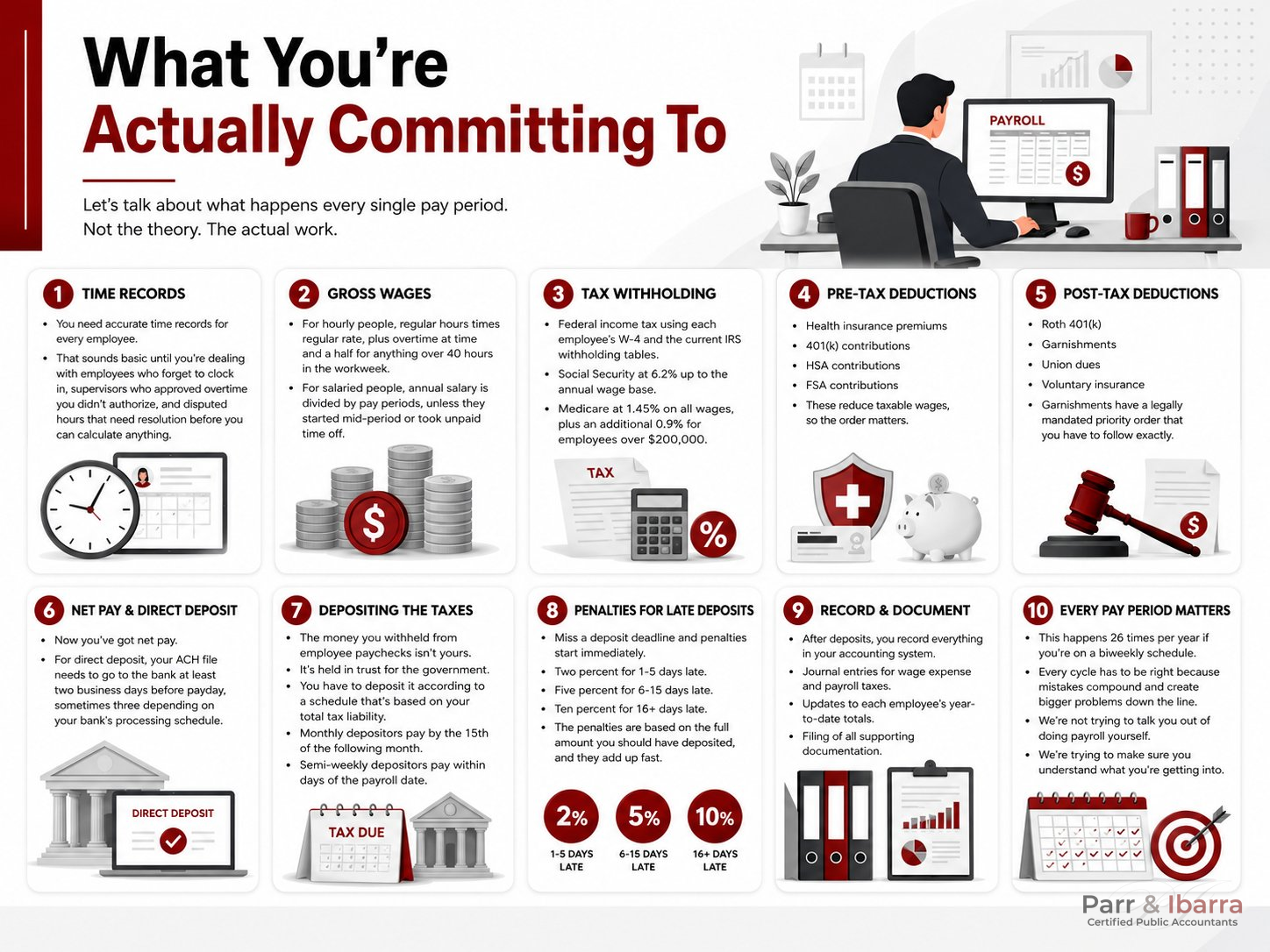
Let’s talk about what happens every single pay period. Not the theory. The actual work.
You need accurate time records for every employee. That sounds basic until you’re dealing with employees who forget to clock in, supervisors who approved overtime you didn’t authorize, and disputed hours that need resolution before you can calculate anything.
Then you calculate gross wages. For hourly people, regular hours times regular rate, plus overtime at time and a half for anything over 40 hours in the workweek. For salaried people, annual salary is divided by pay periods, unless they started mid-period or took unpaid time off.
Now comes tax withholding. Federal income tax using each employee’s W-4 and the current IRS withholding tables. Social Security at 6.2% up to the annual wage base. Medicare at 1.45% on all wages, plus an additional 0.9% for employees over $200,000.
Pre-tax deductions come next. Health insurance premiums, 401(k) contributions, HSA contributions, FSA contributions. These reduce taxable wages, so the order matters.
Post-tax deductions follow. Roth 401(k), garnishments, union dues, voluntary insurance. Garnishments are calculated based on the employee’s disposable income and have a legally mandated priority order that you have to follow exactly.
Now you’ve got net pay. For direct deposit, your ACH file needs to go to the bank at least two business days before payday, sometimes three depending on your bank’s processing schedule.
Then comes the part that creates the most problems: depositing the taxes. The money you withheld from employee paychecks isn’t yours. It’s held in trust for the government. You have to deposit it according to a schedule that’s based on your total tax liability. Monthly depositors pay by the 15th of the following month. Semi-weekly depositors pay within days of the payroll date.
Miss a deposit deadline and penalties start immediately. Two percent for 1-5 days late. Five percent for 6-15 days late. Ten percent for 16+ days late. The penalties are based on the full amount you should have deposited, and they add up fast.
After deposits, you record everything in your accounting system. Solid bookkeeping fundamentals make this step faster and far less error-prone every pay period. Journal entries for wage expense and payroll taxes. Updates to each employee’s year-to-date totals. Filing of all supporting documentation.
This happens 26 times per year if you’re on a biweekly schedule. Every cycle has to be right because mistakes compound and create bigger problems down the line.
We’re not trying to talk you out of doing payroll yourself. We’re trying to make sure you understand what you’re getting into.
Federal Taxes You Can’t Avoid
No state income tax doesn’t mean no taxes. You’re still dealing with substantial federal obligations.
Federal Income Tax Withholding
You withhold federal income tax from every paycheck based on the employee’s Form W-4 and the current IRS withholding tables.
The W-4 changed completely in 2020. Instead of allowances, employees now indicate their filing status, claim dependents, and note additional income or deductions. The old forms with allowances are still valid for existing employees until they want to update them or they start a new job. So you might have a mix of old and new W-4s in your files.
The IRS publishes updated withholding tables every year in Publication 15, also called Circular E. You need the current year’s version. Use last year’s tables and your withholding will be wrong. For a practical walkthrough of how to determine the correct amount of payroll taxes to withhold, the tables vary by filing status, pay frequency, and income level, and errors are easy to make when calculating manually.
Social Security and Medicare
Social Security is 6.2% on wages up to $168,600 for 2024. That wage base goes up almost every year. Once an employee’s cumulative wages for the calendar year exceed that amount, you stop withholding Social Security tax. You need to track this carefully.
Medicare is 1.45% on all wages with no cap. The Additional Medicare Tax adds another 0.9% on wages over $200,000, but that’s employee-only with no employer match.
Both Social Security and Medicare are split 50/50 between employer and employee. You withhold the employee portion from their paycheck and pay the employer portion from business funds. When you make deposits, both halves go in together.
Federal Unemployment Tax
Federal Unemployment Tax (FUTA) is 6.0% on the first $7,000 of each employee’s annual wages. But if you pay your state unemployment taxes on time, you get a credit that reduces the FUTA rate to 0.6%. That’s $42 per employee per year instead of $420.
Texas isn’t a credit reduction state, so as long as you’re currently on Texas unemployment tax, you get the full credit.
FUTA is employer-paid only. Nothing comes out of employee paychecks.

Texas-Specific Requirements
Texas Unemployment Tax
Every Texas employer pays State Unemployment Tax (SUTA) to the Texas Workforce Commission. New employers typically start at 2.7% on the first $9,000 of each employee’s annual wages. That’s $243 per employee per year.
After you’ve been in business for a while, your rate adjusts based on your experience rating. This reflects how many of your former employees filed for unemployment benefits. More claims mean higher rates. Fewer claims mean lower rates.
Rates can range from 0.23% to 6.23%. At the low end, you’re paying about $21 per employee per year. At the high end, you’re paying about $560 per employee per year. The difference is significant when you’re calculating labor costs across your whole workforce.
High turnover damages your experience rating. If you’re constantly hiring and firing, or if you have seasonal workers who file for unemployment during slow periods, your rate will climb.
Texas Payday Law
Texas requires you to establish regular paydays and notify employees what they are. You can choose weekly, biweekly, semimonthly, or monthly. Most Texas businesses use biweekly because it works well with overtime calculations.
Once you set your paydays, you have to stick to them. You can’t delay payroll because cash is tight. That’s illegal.
When someone quits or gets fired, you must pay all wages owed by the next regular payday. You cannot withhold final paychecks for any reason. Not because they didn’t give notice. Not because they didn’t return company property. Not because they damaged equipment or left you in a bind.
Withholding final paychecks creates legal problems that aren’t worth it.
New Hire Reporting
Texas requires you to report new hires to the Texas Directory of New Hires within 20 days of their start date. The state uses this to enforce child support orders.
You can report online at the TWC website. Takes a couple minutes per employee.
Setting Up Payroll From Scratch
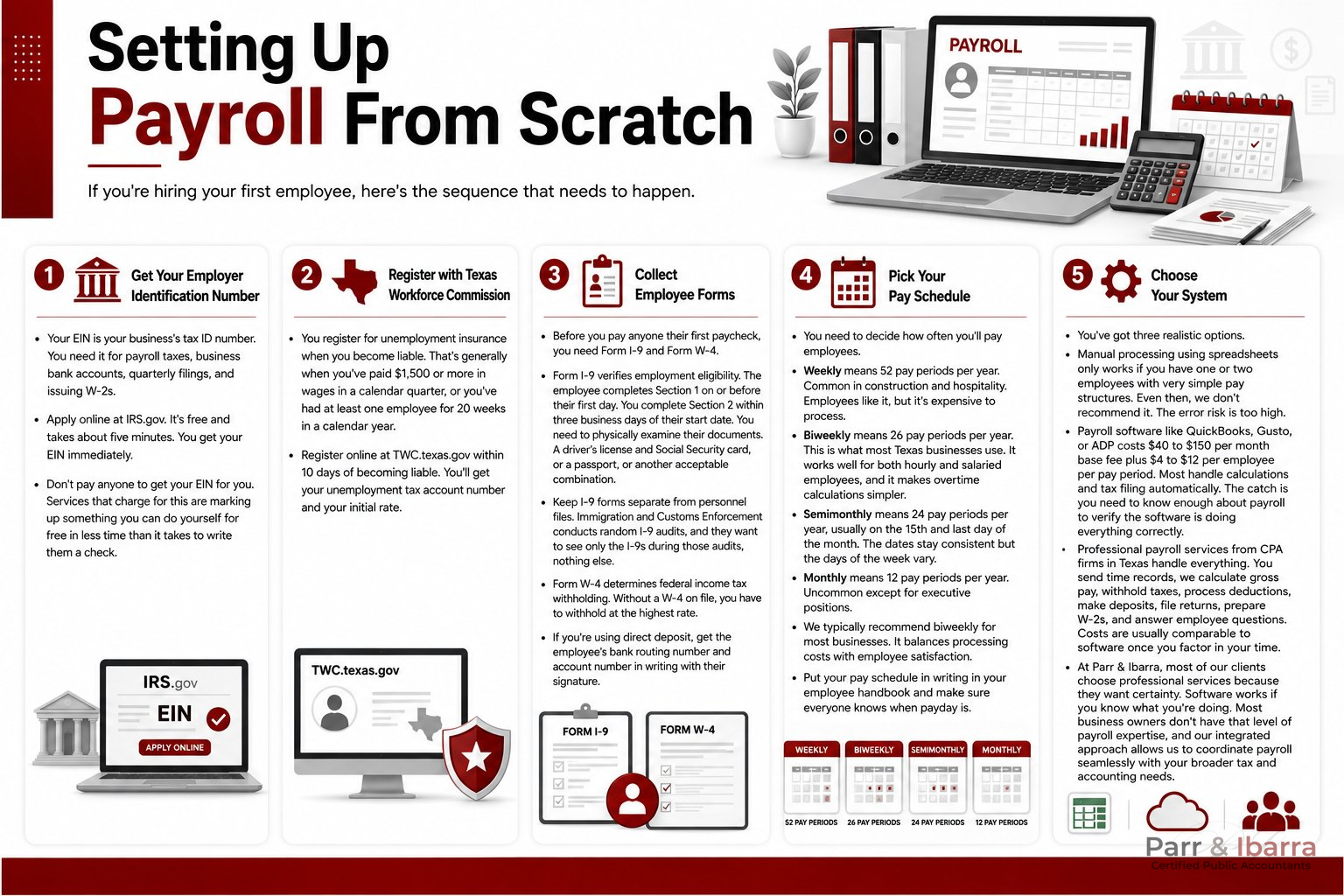
If you’re hiring your first employee, here’s the sequence that needs to happen.
Get Your Employer Identification Number
Your Employer Identification Number (EIN) is your business’s tax ID number. You need it for payroll taxes, business bank accounts, quarterly filings, and issuing W-2s.
Apply online at IRS.gov. It’s free and takes about five minutes. You get your EIN immediately.
Don’t pay anyone to get your EIN for you. Services that charge for this are marking up something you can do yourself for free in less time than it takes to write them a check.
Register with Texas Workforce Commission
You register for unemployment insurance when you become liable. That’s generally when you’ve paid $1,500 or more in wages in a calendar quarter, or you’ve had at least one employee for 20 weeks in a calendar year.
Register online at TWC.texas.gov within 10 days of becoming liable. You’ll get your unemployment tax account number and your initial rate.
Collect Employee Forms
Before you pay anyone their first paycheck, you need Form I-9 and Form W-4.
Form I-9 verifies employment eligibility. The employee completes Section 1 on or before their first day. You complete Section 2 within three business days of their start date. You need to physically examine their documents. A driver’s license and Social Security card, or a passport, or another acceptable combination.
Keep I-9 forms separate from personnel files. Immigration and Customs Enforcement conducts random I-9 audits, and they want to see only the I-9s during those audits, nothing else.
Form W-4 determines federal income tax withholding. Without a W-4 on file, you have to withhold at the highest rate. Note that the W-4 is a different form than the W-9 — if you’re ever unsure which form applies to a given worker, our guide on the differences between Form W-2 and Form W-9 can help clarify which applies in each situation.
If you’re using direct deposit, get the employee’s bank routing number and account number in writing with their signature.
Pick Your Pay Schedule
You need to decide how often you’ll pay employees.
Weekly means 52 pay periods per year. Common in construction and hospitality. Employees like it, but it’s expensive to process.
Biweekly means 26 pay periods per year. This is what most Texas businesses use. It works well for both hourly and salaried employees, and it makes overtime calculations simpler.
Semimonthly means 24 pay periods per year, usually on the 15th and last day of the month. The dates stay consistent but the days of the week vary.
Monthly means 12 pay periods per year. Uncommon except for executive positions.
We typically recommend biweekly for most businesses. It balances processing costs with employee satisfaction.
Put your pay schedule in writing in your employee handbook and make sure everyone knows when payday is.
Choose Your System
You’ve got three realistic options.
Manual processing using spreadsheets only works if you have one or two employees with very simple pay structures. Even then, we don’t recommend it. The error risk is too high.
Payroll software like QuickBooks, Gusto, or ADP costs $40 to $150 per month base fee plus $4 to $12 per employee per pay period. Most handle calculations and tax filing automatically. When evaluating payroll and accounting software, look for platforms that integrate with your existing accounting system, that integration is what makes the per-period reconciliation manageable. The catch is you need to know enough about payroll to verify the software is doing everything correctly.
Professional payroll services from CPA firms in Texas handle everything. You send time records, we calculate gross pay, withhold taxes, process deductions, make deposits, file returns, prepare W-2s, and answer employee questions. Costs are usually comparable to software once you factor in your time.
At Parr & Ibarra, most of our clients choose professional services because they want certainty. Software works if you know what you’re doing. Most business owners don’t have that level of payroll expertise, and our integrated approach allows us to coordinate payroll seamlessly with your broader tax and accounting needs.
Common Mistakes That Cost Money
These are the problems we see most frequently.
Misclassifying Workers as Contractors
Business owners sometimes classify workers as 1099 independent contractors instead of W-2 employees to avoid payroll taxes. The tax implications of hiring employees versus 1099 contractors go well beyond payroll taxes — they affect how you report income, what deductions you can take, and what benefits you’re required to provide.
Do you tell the worker how to do the work, when to do it, where to do it? Do you train them? Do you supervise them? Do you provide tools and equipment? Do you reimburse expenses?
The more control you have, the more likely they’re an employee.
Misclassification triggers back payroll taxes for both the employer and employee portions, penalties up to 20% of wages, interest, and potential criminal charges in serious cases. The IRS actively pursues these cases.
When in doubt, classify as a W-2 employee. The payroll tax cost is less than the penalty risk.
There are also situations where you may need to issue both a W-2 and a 1099 to the same individual, for example, when a corporate officer receives both wages and non-employee compensation in the same tax year. Getting the form wrong in either direction creates compliance exposure.
Missing Tax Deposit Deadlines
Payroll taxes have to be deposited on a schedule that’s based on your total tax liability during a lookback period.
If you had $50,000 or less in total tax liability during the lookback period, you’re a monthly depositor. Deposit by the 15th of the month following the month you ran payroll.
If you had more than $50,000, you’re a semi-weekly depositor. Your deadline depends on what day you paid employees. Paid on Wednesday through Friday? Deposit by the following Wednesday. Paid on Saturday through Tuesday? Deposit by the following Friday.
If you accumulate $100,000 or more in tax liability on any day, you must deposit by the next business day regardless of your normal schedule.
Penalties start immediately when you miss deadlines. Two percent for 1-5 days late, five percent for 6-15 days late, ten percent for 16+ days late, fifteen percent if you don’t pay within 10 days of getting an IRS notice.
The amounts you withheld from employee paychecks are trust fund taxes. If you don’t pay them, the IRS can pursue responsible parties personally through the Trust Fund Recovery Penalty. That includes business owners, officers, and anyone with check-signing authority who knew about the problem.
They can seize personal assets. Houses, cars, bank accounts, retirement accounts.
Don’t miss payroll tax deposits.
Getting Overtime Wrong
Federal law requires time and a half for hours over 40 in a workweek. Texas doesn’t have daily overtime like some states. It’s purely based on the workweek.
Your workweek is any fixed, regularly recurring period of 168 hours. It doesn’t have to be Sunday through Saturday. It can be Wednesday through Tuesday if that works better for your business. Once you establish it, you have to stick with it.
Common mistakes: averaging hours over two weeks, giving comp time instead of paying overtime (illegal for private employers), not including certain bonuses in the overtime rate, misunderstanding what counts as hours worked.
The Department of Labor can go back two years for violations, three years if they determine it was willful. You’ll owe back wages, liquidated damages equal to the back wages, and potentially attorney’s fees.
Botching Exempt Classifications
To classify someone as exempt from overtime, you have to pass three tests. All three, not two out of three.
Salary Basis Test: The employee must be paid a predetermined fixed amount each pay period regardless of the quality or quantity of work.
Salary Level Test: They must make at least $844 per week, which is $43,888 annually as of 2024. This threshold has changed in recent years, review the latest overtime tax exemption updates to make sure your exempt employees still meet the current threshold.
Duties Test: Their primary job duties must be executive, administrative, professional, computer-related, or outside sales as specifically defined in federal regulations.
The duties test is where most mistakes happen. The regulations have very specific definitions for each category. Just giving someone a manager title doesn’t make them exempt. Their actual day-to-day job duties have to meet the test.
Misclassifying employees as exempt triggers back overtime wages, liquidated damages, and potentially attorney’s fees.
Not Keeping Proper Records
The IRS requires payroll records for four years. The Department of Labor requires three years of payroll records and two years of supporting documents. Understanding how long to keep different types of payroll records can help you stay compliant without drowning in unnecessary paperwork.
Required records include time and attendance records, wage rate tables, work schedules, pay stubs, payroll registers, tax deposit confirmations, quarterly returns, annual returns, W-2s, 1099s, W-4s, I-9s, benefits enrollment forms, and garnishment orders. For a broader view of what business records you should be keeping across all areas of your operation, the same organized discipline applies.
If you can’t produce records during an audit, the auditor will make assumptions that won’t be in your favor.
Keep your records organized and backed up. Make sure you can access them when you need them.
What Happens Each Pay Period
Here’s the actual process that happens every two weeks if you’re on biweekly payroll.
Throughout the pay period, employees record their time. Time clocks, mobile apps, manual timesheets, whatever system you’re using.
On the last day of the pay period, you collect all the time data. Review it for accuracy. Resolve discrepancies. Verify overtime was authorized. Confirm PTO requests are documented correctly.
Process payroll day. Pull time data into your payroll system. Calculate gross wages. Calculate federal income tax withholding. Calculate Social Security and Medicare. Process pre-tax deductions. Process post-tax deductions. Calculate net pay. Generate pay stubs. Review everything for accuracy.
Submit your ACH file to the bank for direct deposits at least two business days before payday. Print checks for anyone not on direct deposit.
Calculate total tax liability and submit your deposit electronically through EFTPS according to your deposit schedule.
Create journal entries in your accounting system. Update year-to-date totals for each employee. File all supporting documentation.
This entire cycle happens 26 times per year. Every cycle needs to be accurate.
Tax Deposits and Filing Requirements
Understanding deposit schedules and filing deadlines is critical.
Deposit Schedules
Your deposit schedule depends on your total tax liability during a lookback period. For 2026, that’s July 1, 2024 through June 30, 2025.
$50,000 or less makes you a monthly depositor. Deposit by the 15th of the month following the month you paid wages.
More than $50,000 makes you a semi-weekly depositor. Deadlines depend on when you paid wages.
All deposits must be made electronically through the Electronic Federal Tax Payment System (EFTPS). You need to enroll in advance, which can take a week or two. Once enrolled, you can also use it for other federal tax obligations beyond payroll — a useful detail if you’re managing business taxes across multiple categories. If you’re still getting familiar with how to make tax payments to the IRS, EFTPS is the required and most straightforward method for payroll tax deposits.
Quarterly and Annual Filings
Form 941 is due quarterly by the last day of the month following the quarter end. April 30, July 31, October 31, January 31.
Form 941 reports total wages, federal income tax withheld, Social Security wages and tax, Medicare wages and tax, total tax liability, deposits made, and any balance due.
Texas Quarterly Wage Report (Form C-3) is due at the same time to the Texas Workforce Commission.
Form 940 is due January 31 and reports your annual FUTA liability.
W-2s must be provided to employees and filed with the Social Security Administration by January 31.
1099-NEC must be provided to contractors and filed with the IRS by January 31.
All these essential tax deadlines are firm. While business tax extensions exist for some filings, payroll-related obligations generally don’t qualify, and missing them triggers the same penalty schedule described above.
When You Need Professional Help
We’re obviously biased as a CPA firm serving the Dallas-Fort Worth area, but there are clear indicators that you should be working with professional payroll services.
More than five employees: The complexity multiplies as you add people with different rates, schedules, and benefit elections.
Operating in multiple states: Multi-state payroll requires understanding different tax rules, deposit schedules, and filing requirements for each state.
Complex pay structures: Multiple pay rates, overtime, shift differentials, commissions, bonuses, tips.
Offering benefits: Health insurance, 401(k) plan management, HSAs, FSAs all add complexity, and each carries its own compliance obligations that are easy to miss without expert oversight.
You’ve received a notice from the IRS or state: Understanding what an IRS audit involves can be the difference between resolving the issue quickly and letting it spiral. One notice often indicates underlying issues that need professional attention. With recent changes in IRS enforcement priorities and staffing, working with a CPA matters more than ever for staying ahead of compliance risks.
You’re spending more than a few hours per pay period on payroll. Your time has value.
You’re not confident you’re doing everything correctly. If you’re worried about whether you calculated something right, you probably should outsource.
What Quality Services Provide
Comprehensive payroll processing including all calculations, tax deposits, filings, W-2s, 1099s, and new hire reporting.
Audit protection where the provider covers penalties if they make mistakes, this is one of the key advantages of working with a qualified CPA firm over software alone.
Direct support from people who know payroll, not just help desk scripts.
Integration with your accounting software so data flows smoothly. For businesses considering more sophisticated financial management, virtual accounting services can give you expert oversight without the overhead of a full-time hire.
Local presence so you can meet face-to-face when needed.
Industry experience with businesses like yours.
Transparent pricing with clear base fees and per-employee charges. If you’re weighing service delivery models, comparing PEO versus traditional arrangements can reveal real differences in total payroll tax costs.
At Parr & Ibarra, we provide all of this as standard. Our clients across Keller, Grapevine, Hurst, Addison, and the broader DFW area have direct access to our team. We guarantee accuracy. We integrate with major accounting platforms. With deep roots in the area since 2007 and specialized expertise in industries like Real Estate and Restaurants, we understand the local business landscape and work closely with our clients to provide practical, responsive support that’s easy to understand.
Industry-Specific Considerations
Different industries face different challenges.
Restaurants deal with tip reporting requirements, multiple pay rates for the same employee, high turnover, and shift differentials. Restaurant owners should also stay current on changes to the tax treatment of employer-provided meals, which can affect both your tax liability and how you structure employee benefits. With our specialized expertise in the restaurant industry, we understand these unique challenges and provide tailored payroll solutions that address them.
Construction companies handle certified payroll for government contracts, prevailing wage compliance, union vs. non-union requirements, and travel pay.
Healthcare providers track multi-location work when staff works at different facilities, on-call pay requirements, complex benefits, and credentialing.
Retail businesses manage seasonal hiring surges, variable part-time schedules, and commission structures.
Real Estate professionals deal with commission-based compensation, 1099 vs. W-2 classifications for agents, and complex bonus structures. Real estate entities structured as S-corporations should also be aware of specific retirement planning considerations that can meaningfully reduce overall tax liability. With our specialized expertise in real estate, we provide strategic insights and customized payroll services that address the unique challenges and opportunities within this sector.
Professional services firms deal with partner distributions vs. employee compensation, bonus calculations based on billable hours, and significant PTO accruals.
Working with CPA firms in Texas that understand your industry saves headaches and ensures compliance with industry-specific requirements.
Staying Current With Changes
Payroll regulations change constantly. The overtime exemption salary threshold increased to $844 per week in July 2024. The Social Security wage base increases almost every year. Form W-4 continues to evolve. Electronic filing mandates keep expanding.
Keeping current requires dedicated attention. Professional services include compliance monitoring so you don’t have to track regulatory updates yourself. As your business grows, fractional CFO services can complement payroll management with strategic financial oversight, helping you connect compliance decisions to broader business goals.
Why This Matters Beyond Compliance
Proper payroll management affects more than just avoiding penalties.
Accurate, on-time payment builds employee trust and retention. Proper documentation supports your tax deductions, IRS documentation requirements are strict, and organized payroll records are often the first thing auditors review. Correct handling prevents trust fund penalties that can pierce corporate protections. Scalable systems support hiring without creating bottlenecks. Accurate labor cost tracking enables better financial decisions.
Getting Started or Getting Fixed
If you’re setting up payroll for the first time, invest in doing it right from the beginning. The cost of proper systems is less than fixing mistakes later.
If you’re currently handling payroll and unsure whether you’re doing it correctly, get a compliance review. Most CPA firms in Texas offer payroll audits that identify issues before they become penalties.
If you’ve already received notices or penalties, immediate professional help can mitigate damage and prevent additional problems.
Next Steps
Calculate what payroll is actually costing you right now. Include your time, your stress, software fees, and error risk. Compare that to the cost of professional services with guaranteed accuracy.
For most Texas business owners, the answer becomes clear.
We help businesses across all these scenarios at Parr & Ibarra. Our offices in Keller, Grapevine, Hurst, and Addison serve the entire DFW metroplex with experienced payroll services. Let us handle your payroll so you can focus on running your business.
Frequently Asked Questions
Does Texas require employers to withhold state income tax from employee paychecks?
No. Texas has no state income tax, so there’s no state-level income tax withholding requirement. However, you’re still responsible for federal income tax withholding, Social Security, Medicare, and Texas unemployment tax (SUTA). The absence of state income tax simplifies payroll compared to states like California or New York, but it doesn’t eliminate your federal obligations.
How do I know if I should pay payroll taxes monthly or semi-weekly?
Your deposit schedule is determined by your total federal tax liability during a lookback period. If your total liability was $50,000 or less, you’re a monthly depositor and must pay by the 15th of the following month. If it exceeded $50,000, you’re a semi-weekly depositor with deadlines tied to your payroll date. New employers generally start as monthly depositors. The IRS notifies you of any schedule changes, but it’s your responsibility to deposit on time regardless.
What’s the penalty for misclassifying an employee as an independent contractor in Texas?
Misclassification triggers back payroll taxes for both the employer and employee portions, penalties up to 20% of the misclassified worker’s wages, accrued interest, and in serious cases, potential criminal liability. The IRS doesn’t accept “I didn’t know” as a defense — the classification is based on the actual working relationship, not what you call the arrangement or what the worker prefers.
When does a salaried employee in Texas qualify for overtime exemption?
To be exempt from overtime, an employee must pass all three tests: they must be paid on a fixed salary basis regardless of hours worked, earn at least $844 per week ($43,888 annually) as of 2024, and their primary job duties must meet the specific federal definitions for executive, administrative, professional, computer, or outside sales roles. Failing any one of the three tests — even if the other two are met — means the employee is entitled to overtime pay.
How long do Texas employers need to keep payroll records?
The IRS requires you to retain payroll tax records for at least four years from the date the tax was due or paid, whichever is later. The Department of Labor requires payroll records for three years and supporting documents such as time cards and wage rate tables for two years. In practice, most payroll professionals recommend keeping complete payroll records for at least five to seven years to cover potential audit windows across multiple agencies.
Can a Texas employer hold a final paycheck if an employee quits without notice or causes damage?
No. Texas Payday Law requires you to pay all wages owed by the next regular payday, regardless of the circumstances of separation. You cannot withhold a final paycheck because an employee quit without notice, failed to return equipment, caused damage, or owes you money. Doing so exposes you to a TWC wage claim and potential civil liability. If the employee owes a debt to the business, that’s a separate civil matter — not something you can resolve by withholding earned wages.
What’s the difference between FUTA and SUTA, and do Texas employers pay both?
Yes, Texas employers pay both. FUTA (Federal Unemployment Tax Act) is a federal tax paid entirely by the employer at 6% on the first $7,000 of each employee’s wages, though timely SUTA payments reduce the effective rate to 0.6%. SUTA (State Unemployment Tax Act) is Texas’s state unemployment tax, administered by the Texas Workforce Commission. New employers start at 2.7% on the first $9,000 of wages, with rates adjusting over time based on your claims history. Neither tax is withheld from employee paychecks — both are employer-only obligations.
This guide provides general information based on our experience with Texas businesses. It’s not legal or tax advice specific to your situation. Payroll regulations change frequently. For guidance on your particular circumstances, contact a qualified professional like Parr & Ibarra CPA for more details.

