For a remote employee, you withhold federal income tax and FICA the same way you do for anyone else. State income tax is where it gets tricky. In general, you withhold for the state where the employee physically does the work, not the state where your company is based. Reciprocity agreements, day-count thresholds and “convenience of the employer” rules can change that, so you need to know where each person actually sits when they work.
This guide explains what to withhold, where, and how to set up payroll so it stays right when people move or travel. If you run a business in Dallas-Fort Worth with staff in other states, it applies to you directly.
TL;DR
- Federal income tax and FICA follow the same rules for remote and on-site employees. State withholding generally follows the state where the work is physically performed.
- Hiring one remote employee in a new state can require you to register with that state’s tax agency, even if you have no office there.
- Reciprocity agreements and convenience-of-the-employer rules (New York, Pennsylvania, Delaware, Nebraska, Arkansas and a few others) can override the basic rule.
- Keep a current record of each employee’s work location, and update it when they move or travel for extended periods.
- A CPA or payroll specialist should review any employee who lives in one state and works for a company in another.
What you withhold federally, wherever the employee works
Federal rules do not care whether the employee works from your office or a spare bedroom in another state. Income tax withholding is based on the employee’s Form W-4 and the IRS withholding tables. Social Security and Medicare apply on top. For 2026, the IRS Publication 15 sets the Social Security rate at 6.2% each for employer and employee, with a wage base limit of $184,500, and the Medicare rate at 1.45% each, with no wage base limit.
So the federal side of remote payroll is the easy part. Collect a W-4 from each new hire, withhold per the IRS tables, deposit on schedule and file the usual returns. The complexity starts when you add state and local taxes.
Which state do you withhold for?
The baseline rule: an employer generally withholds income tax in the state where the work is physically performed, subject to exceptions such as thresholds and convenience-of-the-employer rules. Your headquarters does not set the answer.
That holds even if you have no presence in that state. According to Holland & Knight’s summary, if an employee moves to a different state, the employer must register with that state’s tax agency and withhold under its laws, even for a temporary move.
A simple example: a company based in South Carolina has an employee working from home in Georgia. The employer is likely to have an income tax withholding obligation in Georgia, not South Carolina.
What this means for a Texas employer
Texas has no state personal income tax, so a Texas-based employee working in Texas has no state income tax withheld. That advantage does not travel. If your Dallas-based company hires a bookkeeper in Oregon or a salesperson in California, you are withholding for those states under their rules. Texas headquarters does not exempt the out-of-state employee.
How much states expect you to withhold
States generally require withholding of an amount “substantially equivalent” to the personal income tax reasonably estimated to be due on wages earned in the state, according to the National Conference of State Legislatures (NCSL). Each state publishes its own withholding forms or tables, so you cannot reuse another state’s setup.
When the employee lives in one state and works in another
This is the case that causes the most errors. The employee’s home state may tax their wages as a resident, while the work state may tax the same wages as source income. States try to prevent double taxation, but the mechanics land on both you and the employee.
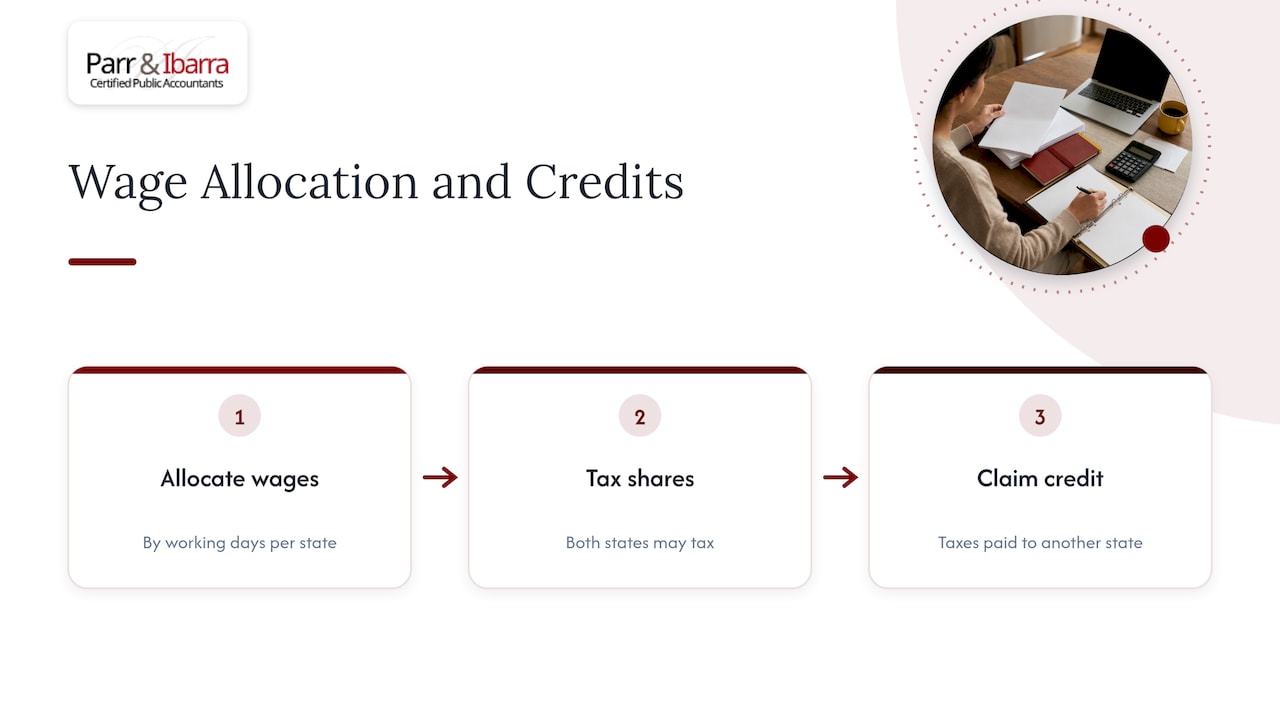
According to NCSL, states mitigate double withholding by allocating wages based on working days spent in each state and by allowing a credit for taxes paid to another state. The credit is claimed on the employee’s return, so it does not always stop the over-withholding that happens during the year.
Thresholds that trigger withholding
Some states do not require withholding from the first day. They set a number of days in the state before the obligation starts, and those numbers differ:
| State | Day threshold for nonresident withholding | Source |
|---|---|---|
| New York | More than 14 days in a calendar year | NCSL |
| Illinois | More than 30 days in a calendar year | Holland & Knight |
| California | Generally withholding on nonresidents for services performed in the state | Palm Springs Tax and Trust Lawyers |
The thresholds above are examples, not a full list. State laws vary on when an employee counts as working in the state, so check each state’s current rules for the specific employee.
Employees who work in several states
If an employee splits time across states, you may need to withhold and remit income tax to each state where they worked. Practically, that means you need day-by-day records of where the person worked, not just a home address. For a deeper look at the registrations involved, see our guide to multi-state payroll taxes.
Reciprocity agreements and convenience-of-the-employer rules
Two mechanisms can change the baseline answer, in opposite directions.
Reciprocity agreements
Some neighboring states have agreements under which an employee who lives in one state and works in the other has income tax withheld only for the state of residence. According to the American Employers Alliance, examples include New Jersey and Pennsylvania, and several states around Washington, D.C. These are not universal, and each pair of states agrees independently. The employee usually has to file an exemption certificate with you for the work state, so ask for it when you onboard them.
Convenience-of-the-employer rules
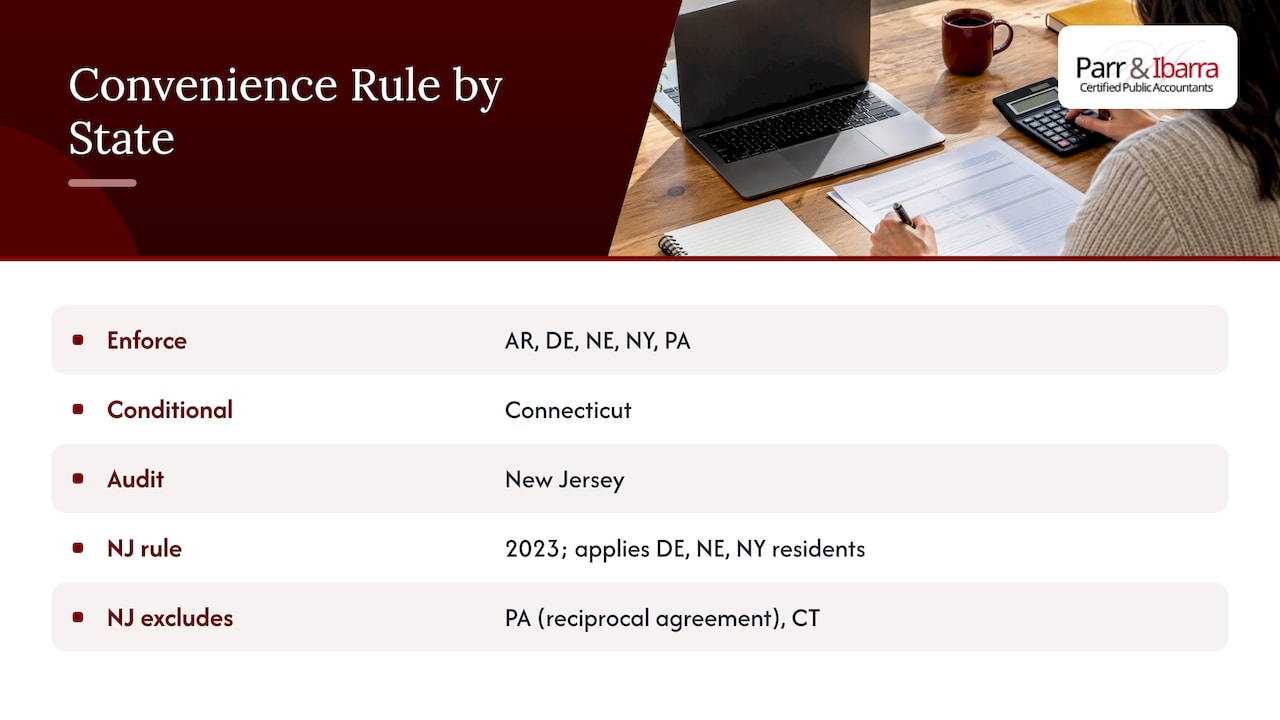
A handful of states go the other way. Under a convenience rule, if a nonresident works remotely for their own convenience rather than because the employer requires it, the employer’s state can claim withholding on those wages even though the work happens elsewhere. One summary lists Arkansas, Delaware, Nebraska, New York and Pennsylvania as enforcing it, with Connecticut conditionally and New Jersey in the event of an audit.
New Jersey’s version shows how narrow these rules can be. Its rule, effective for tax year 2023, applies to nonresident employees working for a New Jersey employer who live in states that also impose a similar test (Delaware, Nebraska and New York). It does not apply to Pennsylvania residents because of a reciprocal agreement, and Connecticut residents are also outside it, per the New Jersey Division of Taxation FAQ.
If you have an employee who lives in a convenience-rule state, or you are based in one, review the facts with a tax professional. Whether a home office counts as a genuine employer office is a fact-specific question, and the answer decides which state gets the withholding.
Local taxes and state registrations
Local taxes
Cities, counties and school districts can also impose taxes. NCSL notes that many local taxes may be triggered by the presence of a remote worker. Some work like a state income tax, and others are unique to the locality. Add a local tax check to your onboarding, using the employee’s exact home address.
Registrations beyond income tax
Withholding is only one piece. Putting an employee in a new state typically means:
- Registering with the state revenue agency for income tax withholding, where the state has an income tax.
- Opening a state unemployment insurance account.
- Obtaining workers’ compensation coverage that is valid in that state.
- Meeting any state paid leave or disability program requirements.
The American Employers Alliance lists employer tax ID numbers, unemployment insurance accounts and workers’ compensation among the registrations to complete in each required state. Do these before the first payroll, because late registration can bring penalties and back assessments.
Setting up payroll for a remote team
The process below follows the approach the American Employers Alliance recommends, adapted into steps you can run in order.
- Map where everyone works. Record the physical work address of each employee, not the mailing address or your office. Re-confirm it at least once a year and whenever someone tells you they are moving.
- Register before you pay. Complete state withholding and unemployment registrations for each state where you have an employee.
- Configure payroll with accurate work-location data. Your payroll system should apply the right state and local rules to each person. Wrong location data produces wrong withholding.
- Collect the right forms. Get the federal W-4, the state withholding form where it applies, and any reciprocity exemption certificate.
- Track travel and temporary moves. Days in another state can trigger thresholds, and a temporary move can still require registration.
- Watch for rule changes. States update rates, thresholds and sourcing rules, so assign someone to review them on a schedule.
Tracking location data is partly a communication problem. Employees need an easy way to tell you when they move. Shared tools help, and these practical tips for keeping a remote team’s email aligned can make sure a “I’m relocating next month” message reaches the person who runs payroll instead of sitting in one inbox.
Common mistakes
- Withholding for the company’s state because that is where payroll is run.
- Treating a temporary relocation as irrelevant to payroll.
- Assuming reciprocity applies without checking that the two states actually have an agreement.
- Ignoring local taxes because the state has none.
- Not reviewing the setup until an employee or a state agency raises a question.
For wider payroll tax duties beyond remote work, our explainer on payroll tax obligations for small business owners covers deposits, filings and recordkeeping.
Getting remote payroll handled
If you would rather not track state rules yourself, we can help. Parr & Ibarra CPA serves business owners in Dallas-Fort Worth with payroll services, bookkeeping and proactive tax planning. We work with owners who are adding employees in other states and want the registrations, withholding setup and year-round planning done correctly. You can also see how tax planning for Texas business owners fits in when your team spreads beyond the state. To talk through your situation, start at our tax services page.
FAQ
Do I withhold my state’s income tax or my remote employee’s state’s tax?
Generally, you withhold for the state where the employee physically performs the work. Exceptions include reciprocity agreements, day-count thresholds and convenience-of-the-employer rules. Check the specific states involved before setting up the employee.
Does a Texas employer withhold state income tax for remote employees?
Not for employees who work in Texas, since the state has no personal income tax. If the employee works in a state that taxes income, you generally need to register there and withhold under that state’s rules. Your Texas location does not remove that duty.
What if my employee moves temporarily to another state?
A temporary move can still trigger withholding and registration. According to Holland & Knight, the employer must register and withhold under the new state’s laws even for a temporary move. Ask employees to tell you before they relocate, even for a few weeks.
Are Social Security and Medicare taxes different for remote employees?
No. They apply at the same federal rates regardless of where the employee works. For 2026, the IRS Publication 15 gives 6.2% for Social Security up to the wage base and 1.45% for Medicare, each paid by both employer and employee.
Who should I ask when two states both claim the wages?
A CPA who handles multistate payroll. They can confirm thresholds, reciprocity and credit for taxes paid to another state, and they can correct past filings if needed.
Sources
- IRS Publication 15 (2026), Employer’s Tax Guide
- Council of Nonprofits: Remote Workers, State and Local Tax Implications
- Holland & Knight: Legal implications of remote work arrangements
- Ogletree: Do You Know Where Your Workers Are?
- NCSL: State and Local Tax Considerations of Remote Work Arrangements
- 2023 State Tax Nexus Guide
- Palm Springs Tax and Trust Lawyers: Nonresidents Working Remotely for California Businesses
- American Employers Alliance: Multistate Employer Tax Obligations
- New Jersey Division of Taxation: Convenience Rule FAQ
- PeopleKeep: How Do Taxes Work for Remote Workers